


Ink
English | 简体中文
An open-source AI assistant and agent harness for the terminal. Use Ink for research, writing, analysis, software development, and other tool-assisted tasks. Built from scratch, inspired by pi.
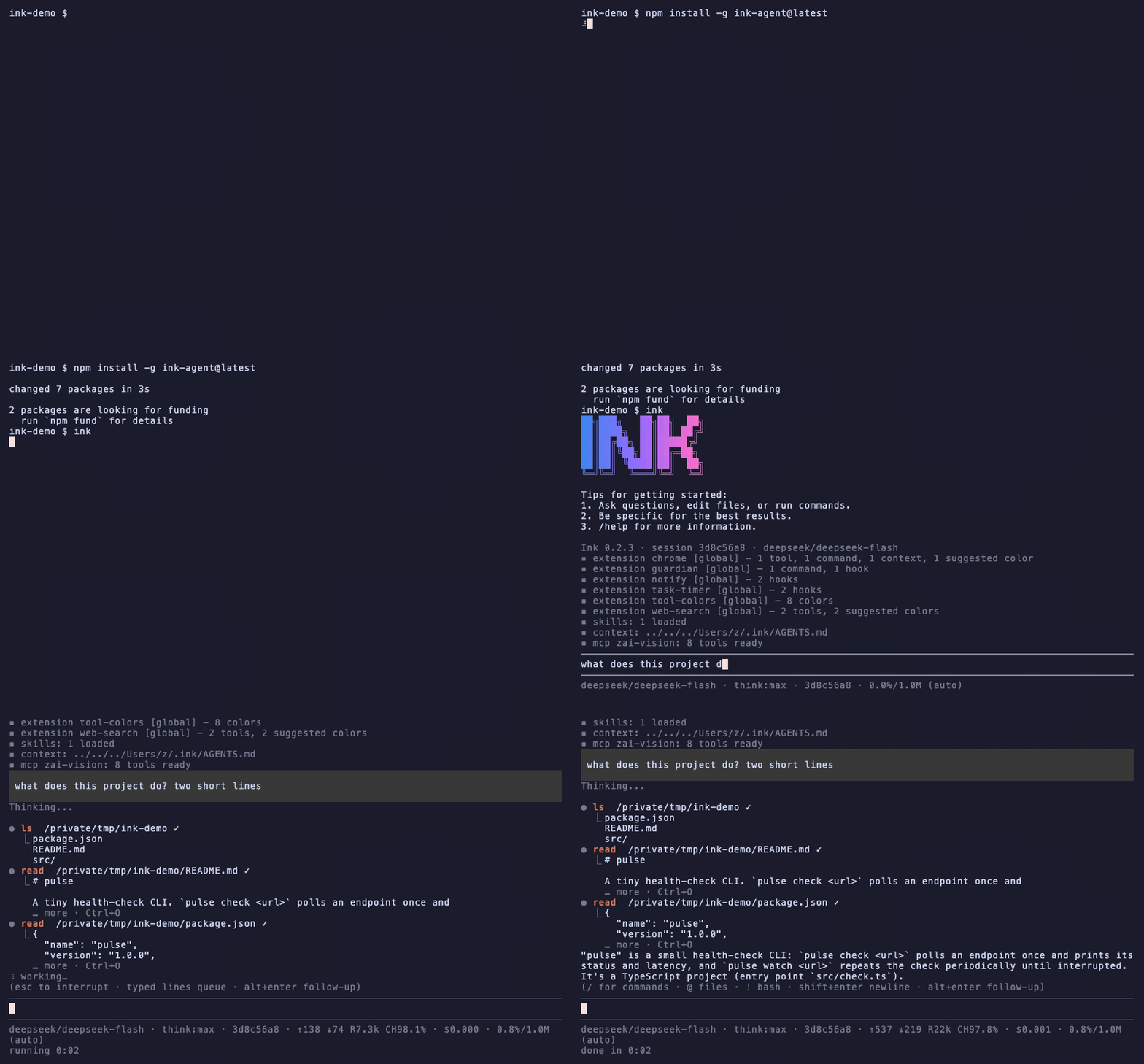
Adapt Ink to your workflows, not the other way around: extend it with extensions, skills, named subagents, and MCP servers — the bundled examples (extensions, a subagent, a skill) show how.
Getting started
Install and run in the directory where you want it to work:
npm install -g ink-agent@latest
cd /path/to/project
ink
Verify a non-interactive install with ink --version (prints Ink <version>)
or ink --help; for scripted one-shot use ink -p "question" prints the
answer and exits. The registry package runs no install lifecycle scripts.
Uninstall with npm uninstall -g ink-agent.
Or let npm infer the single ink executable from the explicit package:
npm exec -- ink-agent@latest --help
Sign in with /login inside a session — pick a provider and enter its
API key (stored in ~/.ink/auth.json, where it beats the environment
variable); the ChatGPT plan signs in via OAuth device code. Or set an
environment variable before launching (e.g.
export ANTHROPIC_API_KEY=sk-ant-...; all providers and credential
methods are in providers.md). Give Ink a task.
For a full walkthrough, start at the documentation topic
map.
Working from a source checkout instead:
npm install   # installs dependencies and builds (prepare script)
npm start     # launches the interactive REPL
Do not copy credentials, migrate state, or publish when updating a source
checkout; for a normal install use the npm package above. Ink reads
~/.ink and INK_* configuration only and never touches historical
.imp state — see docs/cli.md.
What's inside
A working assistant with an interactive terminal interface, persistent sessions, and extensible tools:
- Interactive TUI (streaming, one-line tool status, queued steering and
follow-up runs) plus print mode (
ink -p "...") and piped stdin - Agent loop: streaming LLM calls + tool execution, with abort, validation, error feedback, steering hooks, and a compaction hook
- Sessions: append-only JSONL message trees (
~/.ink/sessions/),--continue/--resume <id>/ink sessions, the/treenavigator,/fork - Auto-compaction: near the context window, older turns are LLM-summarized into a checkpoint; recent turns and the full history on disk are preserved
- Tools:
bash(timeout, truncation),read(offset/limit, images),edit(exact-match multi-edit),write,grep(ripgrep),find(fd),ls,task(subagents) — search tools respect .gitignore - Providers: Anthropic, OpenAI (API key or ChatGPT-plan OAuth), Z.AI (GLM),
DeepSeek, Moonshot/Kimi (international and CN endpoints) — credentials
from environment variables or
/login - Extensions, skills, named subagents, MCP servers, markdown quick commands, and custom system prompts (SYSTEM.md)
Roadmap and the historical implementation ledger live in PROJECT_PLAN.md;
every feature's design documents and review records live in
docs/design/ (not shipped in the npm package).
Interactive mode in one screen
Run ink with no arguments for an interactive session over one shared
conversation and session. Plain lines go to the model; lines typed while Ink
is working are queued (steer: on Enter, follow-up: on alt+enter —
alt+up pulls them back). Ctrl+C aborts the running turn (twice to exit);
Ctrl+D exits; Ctrl+O expands every fold; Ctrl+L opens the model picker;
Shift+Tab cycles thinking; Ctrl+T hides reasoning traces.
Slash commands: /help, /exit, /new, /fork <n>, /tree, /sessions,
/resume <id>, /model [id], /think [level], /compact, /status,
/copy, /name, /trust, /worktrees, /login, /logout, /mcp,
/settings. Unknown commands get a hint instead of reaching the model;
prefix a line with a space to send a literal leading /. Details:
sessions.md.
Terminal notes for the alt keys: iTerm2, Ghostty, Kitty, and recent VS Code
terminals work out of the box. WezTerm binds Option+Enter to fullscreen by
default and Alacritty may send a plain Return — map both to \x1b[13;3u,
or use esc+p.
Documentation
Full documentation lives in docs/index.md — start there for a topic map — and is published as a site at fishinsalt.github.io/ink:
- CLI reference — install, print mode, piping, every flag and env var
- Providers and models — sign-in, families,
/model, the pi.dev model catalog - Sessions — the JSONL tree,
/tree,/fork, compaction, steering and follow-ups - Settings — settings.json keys, SYSTEM.md, markdown quick commands
- Extensions — tools, commands, event gates, colors, the bundled examples
- Skills — SKILL.md packages, discovery tiers
- MCP — stdio and Streamable HTTP servers, config discovery
- Subagents — the
tasktool, named agents, worktree isolation - Images — vision models, paste, the resize ladder
The npm package ships this documentation; the agent routes its own questions through it. The bundled examples — extensions, a named subagent, a skill — install alongside.
Platform support
- macOS — the development platform; features are exercised here first.
- Linux — supported: CI runs the full gate (typecheck, lint, build,
tests) on
ubuntu-latestwith the exact Node 22.19.0 minimum and Node 24. CI requiresrgandfdso search-tool tests cannot silently skip. - Windows — not supported yet. Native Windows has known blockers (the
bashtool spawns/bin/bash, and MCP servers spawn without.cmd/ shell resolution) and no CI coverage. WSL does work — inside it Ink is plain Linux.
External tools are optional and platform-dependent: rg / fd back the
grep / find tools (missing binaries are reported with install hints; the
rest of Ink works without them), and clipboard image paste uses osascript
on macOS and wl-paste / xclip on Linux.
Development
npm run build          # tsc
npm run dev            # tsx src/cli.ts (no build)
npm run typecheck      # tsc --noEmit (both configs)
npm run lint           # biome + script syntax checks
npm test               # vitest run
Design archive: every feature's design document and review record lives in
docs/design/ (not shipped in the npm package).
RELEASING.md documents the release process. The repository
was renamed from FishInSalt/imp; GitHub redirects the old URLs, and
historical release and design records keep their original names.